How to remove blank pages and rotate sideways pages in a scanned PDF
Clean up a double-sided scan by removing blank sheets and turning only the pages that need correction.
By PDF Bop ·
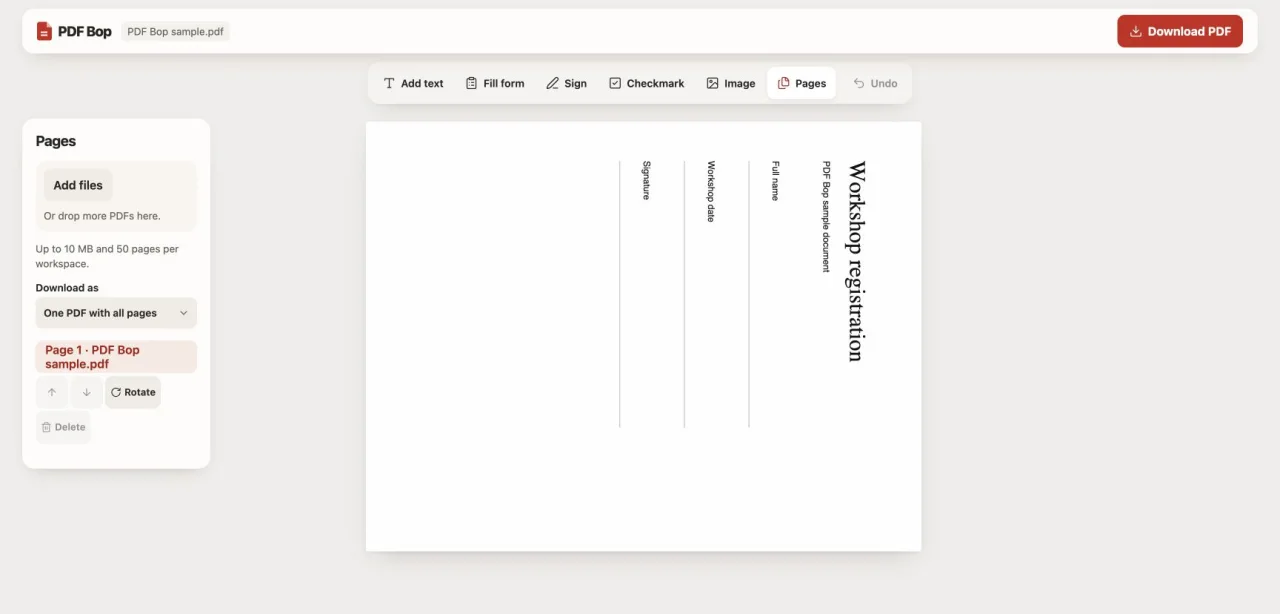
When a double-sided scan includes a mix of upright pages, sideways receipts, and blank backs, inspect the document before using a page action. A page that looks nearly blank may still contain a stamp or signed note near the edge.
Fix the page orientation
- Open Rotate PDF pages and select the sideways page in Pages.
- Use Rotate on the page row. Each press turns that page a quarter turn.
- Check the preview for upright text. Apply the same action to any other sideways pages individually.
Remove blank pages
Use Delete on the corresponding page row or open the same workflow from Delete PDF pages. Check the document preview and page list after each removal because subsequent page numbers will shift. Undo restores the most recent change if you removed the wrong page.
For an eight-page scan with three empty backs, expect five pages in the export. Reopen the downloaded PDF and check the final page count and orientation. This workflow changes the page arrangement and orientation. Any text in an image-only scan still behaves like an image.